How to Build a Custom CRM for Your Business: Architecture, Database Design & Key Features
Why Businesses Outgrow Generic SaaS CRMs
Generic CRM software is designed to appeal to the widest possible audience, which inevitably creates two major problems: feature bloat and restrictive data models. Small to mid-sized sales teams frequently use less than 20% of the features they pay for, yet face severe billing penalties as they onboard more team members.
Furthermore, when your company introduces a unique sales or fulfillment workflow, adapting a generic SaaS CRM typically requires expensive third-party consultants, brittle integration middleware, or costly tier upgrades.
- Zero per-seat licensing penalties: Hire 5 or 500 sales reps without increasing software costs
- Exact workflow alignment: Pipelines, stages, and custom fields tailored directly to your team
- Complete data sovereignty: Sensitive customer lists remain strictly on your private infrastructure
- Direct native integrations: Zero reliance on rate-limited third-party connector tools
Core Architectural Components of a Custom CRM
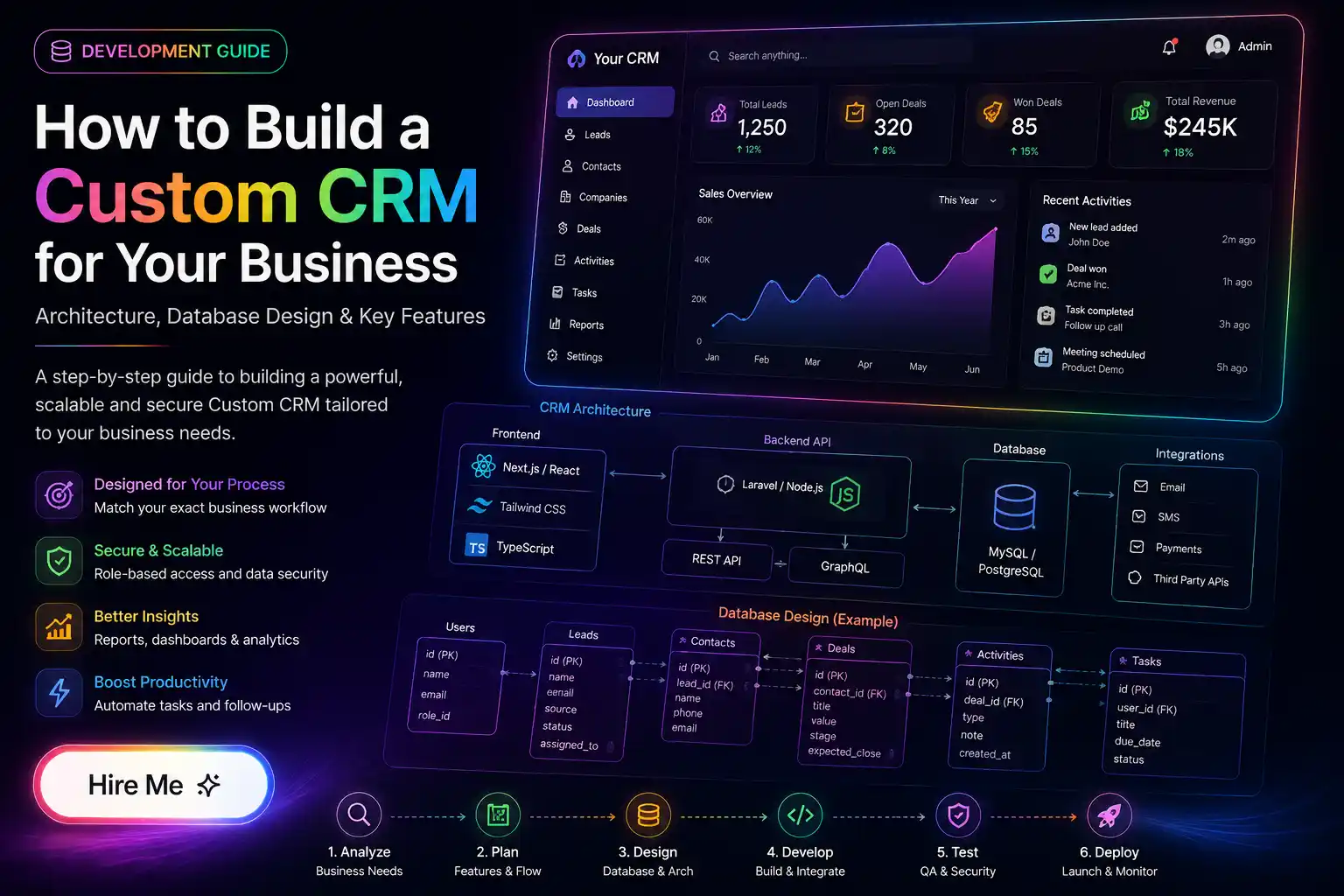
A resilient custom CRM requires a modern, decoupled architecture capable of handling concurrent read/write operations, real-time activity streams, and secure role-based access control (RBAC).
On the backend, robust frameworks like Laravel 12 or Node.js provide transaction-safe ORM layers, scheduled background queue workers for email parsing, and RESTful API endpoints. On the frontend, Next.js or React delivers fluid single-page responsiveness with optimistic UI updates for rapid drag-and-drop pipeline interactions.
Database Schema & Entity Relationship Strategy
At the core of any high-performance CRM is a normalized relational database (MySQL or PostgreSQL). The data schema should cleanly decouple Organizations, Contacts, Deals/Opportunities, Activities, and Custom Field Definitions.
To maintain sub-second search speeds across millions of contact records, implement database indexing across email fields, phone numbers, and company identifiers, accompanied by Redis caching for frequently accessed dashboard aggregates.
Engineering Real-Time Pipelines & Automations
The primary conversion driver in a CRM is sales team responsiveness. Automating lead routing from website inquiry forms directly into assigned sales rep queues reduces initial contact latency from hours to seconds.
Integrating automated webhooks and transaction email services (such as Resend or SendGrid) allows the CRM to automatically log sent proposals, schedule automated reminder follow-ups, and notify managers of stale deals.
Cost Considerations & Long-Term ROI
While custom CRM development requires an initial capital investment (typically $5,000 to $20,000 depending on complexity), the break-even point against SaaS subscriptions with 15+ seats is often reached within 12 to 18 months.
Beyond license cost savings, the greatest return on investment comes from increased sales velocity and elimination of manual data entry friction across your organization.
Need Engineering Review for Your Project?
Written by Prakash Solanki • Senior Full Stack & AI App Engineer
Building a custom CRM is a strategic asset that grows in value as your business scales. If you are ready to explore building a tailored CRM system for your sales or operations team, let's connect to discuss your exact workflow requirements.